

InsightCut
A local-first, editable, and recoverable AI image-video workspace
Turn a topic or complete manuscript into storyboards, visuals, voiceovers, subtitles, previews, and editable Jianying / CapCut drafts.
简体中文 · English






Showcase · Quick Start · Product Tour · Website & docs · Issues
InsightCut is built for explainers, educational videos, knowledge content, opinion pieces, and short-form production. It is not a one-shot page that returns a single MP4. Each project keeps its manuscript, storyboard, image prompts, images, voiceovers, subtitles, and export history available for further editing.
| Editable after generation Revise one segment, prompt, image, or voiceover without restarting the entire workflow. |
Resume after failure Completed assets remain available, and recovery retries only missing or failed targets. |
Deliver video and project files Export MP4, per-segment assets, and editable Jianying / CapCut drafts. |
The database, media files, configuration, and voice-clone references stay on your machine by default. InsightCut is not affiliated with Jianying, CapCut, ByteDance, or their subsidiaries.
Start from one line
Start from a short topic or paste a complete manuscript. Confirm the project name, aspect ratio, visual style, and writing style before generation. Topic mode expands the input into a full manuscript for review, while script mode preserves the supplied text.
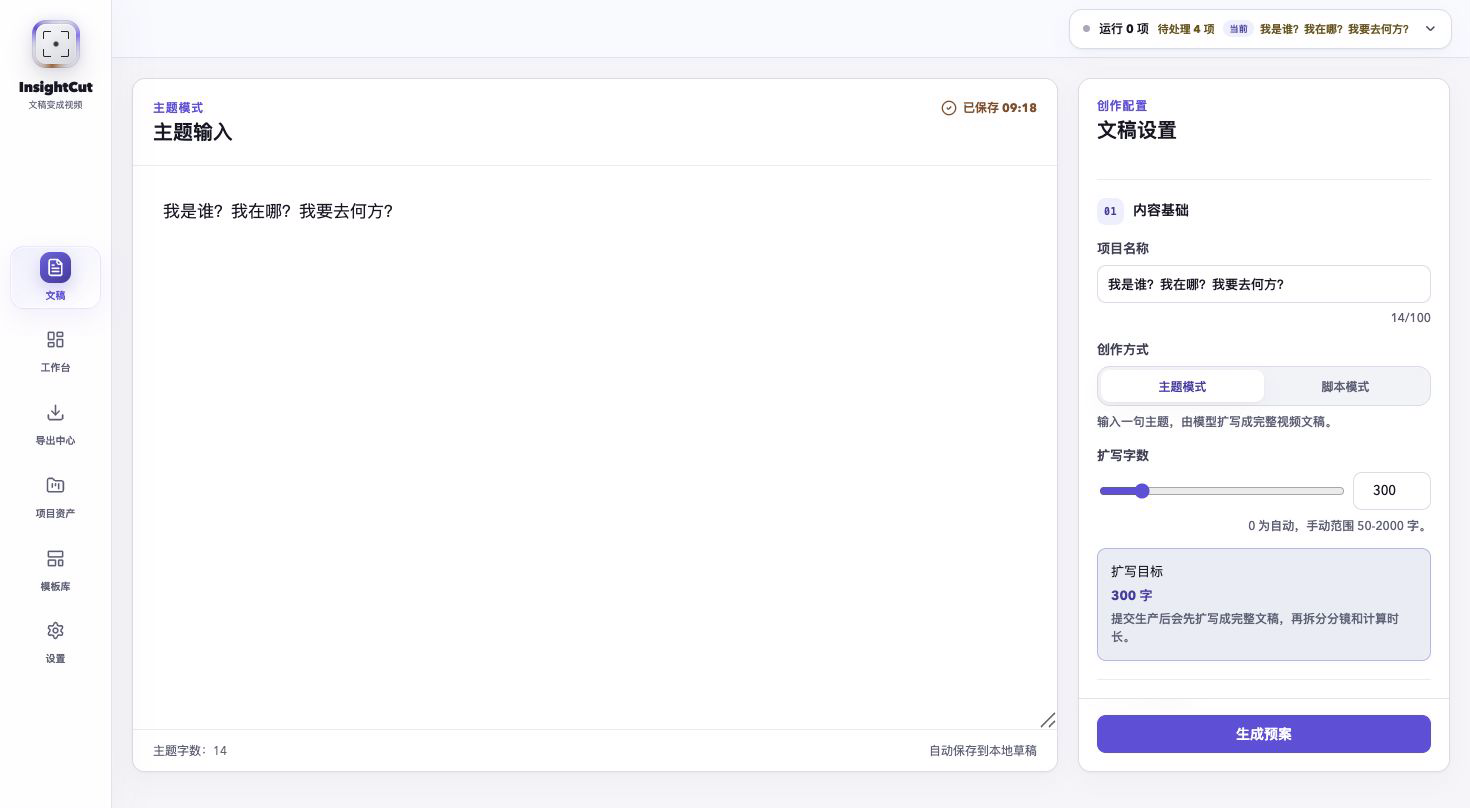
Real output
Every example below was produced from a real local InsightCut task. The underlying manuscript, segments, prompts, images, voiceovers, subtitles, and export records remain editable after completion.
Open the complete video showcase →
Who Am I? Where Am I? Where Am I Going?
Topic mode · Original input: 我是谁?我在哪?我要去何方?
Warm, reflective writing · Felt art · 16:9 · 20 segments · 01:09
InsightCut expanded those 14 Chinese characters into the manuscript, storyboard, prompts, images, voiceover, subtitles, and final video. No extra script was written for the showcase.
https://github.com/user-attachments/assets/3c8061af-0100-453c-af08-614a55dd24f0
Island Economics
Script mode · Input: a complete educational manuscript
Educational writing · Felt art · 16:9 · 01:02
https://github.com/user-attachments/assets/34833f83-5416-41b9-9a75-b47ddd0e5f05
Thirty Years East, Thirty Years West
Topic mode · Original input: 30 年河东,30 年河西,莫欺少年穷
Educational writing · Ghibli-inspired · 16:9 · 18 segments · 00:44
https://github.com/user-attachments/assets/989b52b5-2f3e-4ed6-9a36-6c26fd02f606
Growth Is the Best Remedy
Script mode · Input: a complete motivational manuscript
Motivational writing · Cinematic · 16:9 · 01:03
https://github.com/user-attachments/assets/de662301-8653-43bf-bf54-31a6d7d2dba1
Why Busy Adults Need Deliberate Empty Space
Script mode · Input: a complete educational manuscript
Educational writing · Cinematic · 9:16 · 00:55
https://github.com/user-attachments/assets/7d7b050e-25c2-4f4f-8cf5-1ab3f7157a95
Do Not Mistake Busyness for Growth
Script mode · Input: a complete spoken-word manuscript
Conversational writing · Chinese illustration · 3:4 · 00:52
https://github.com/user-attachments/assets/e4695fbc-2339-4102-b631-bcf61df63264
Production and project surfaces
Production workspace
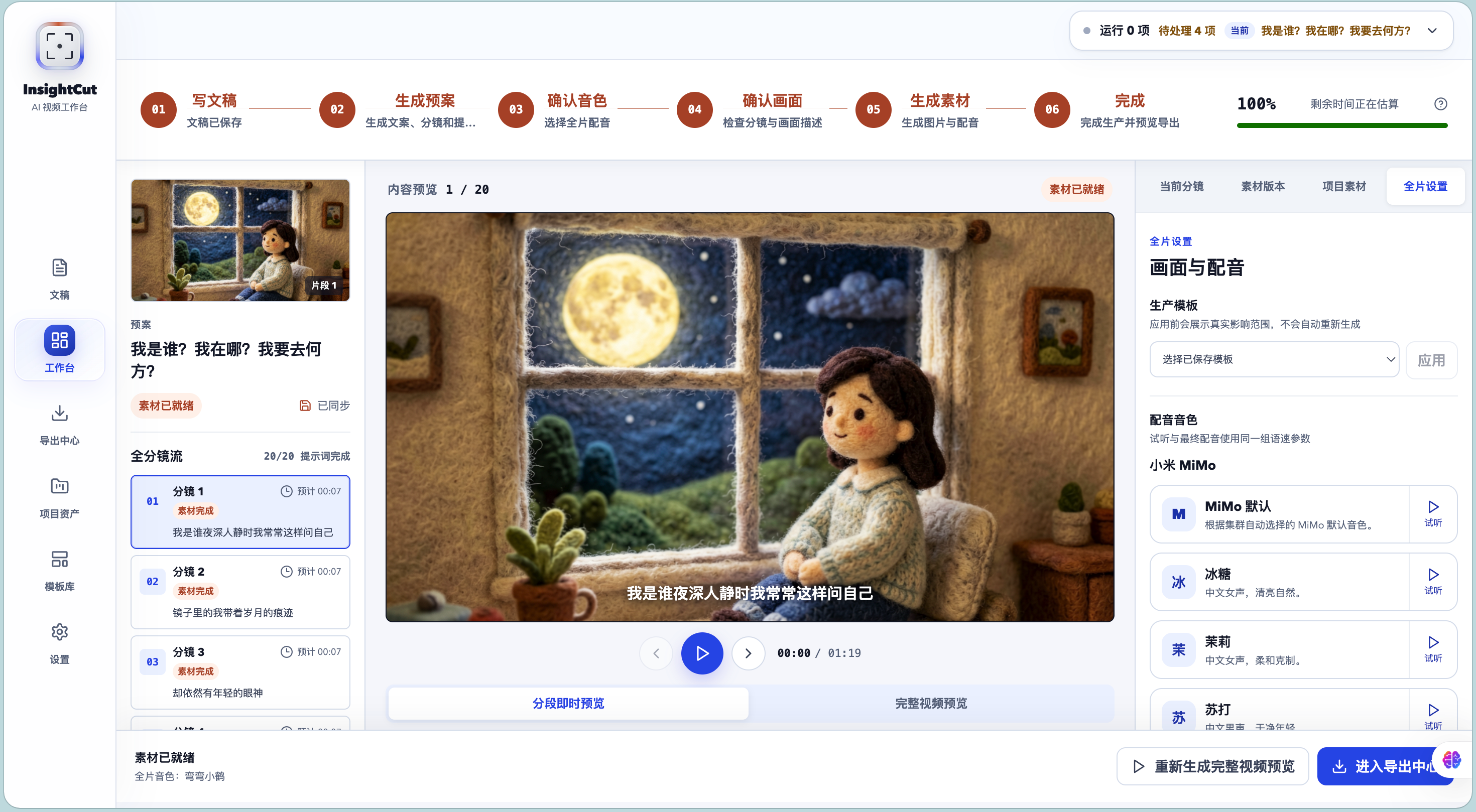
The spatial workspace keeps all six production stages visible. Browse segments on the left, preview the current scene in the center, and manage segment settings, immutable asset versions, project media, and full-video settings on the right.
Regeneration and uploads append new versions instead of overwriting old files. Existing versions can be reviewed, played, and restored without another model call.
Project library
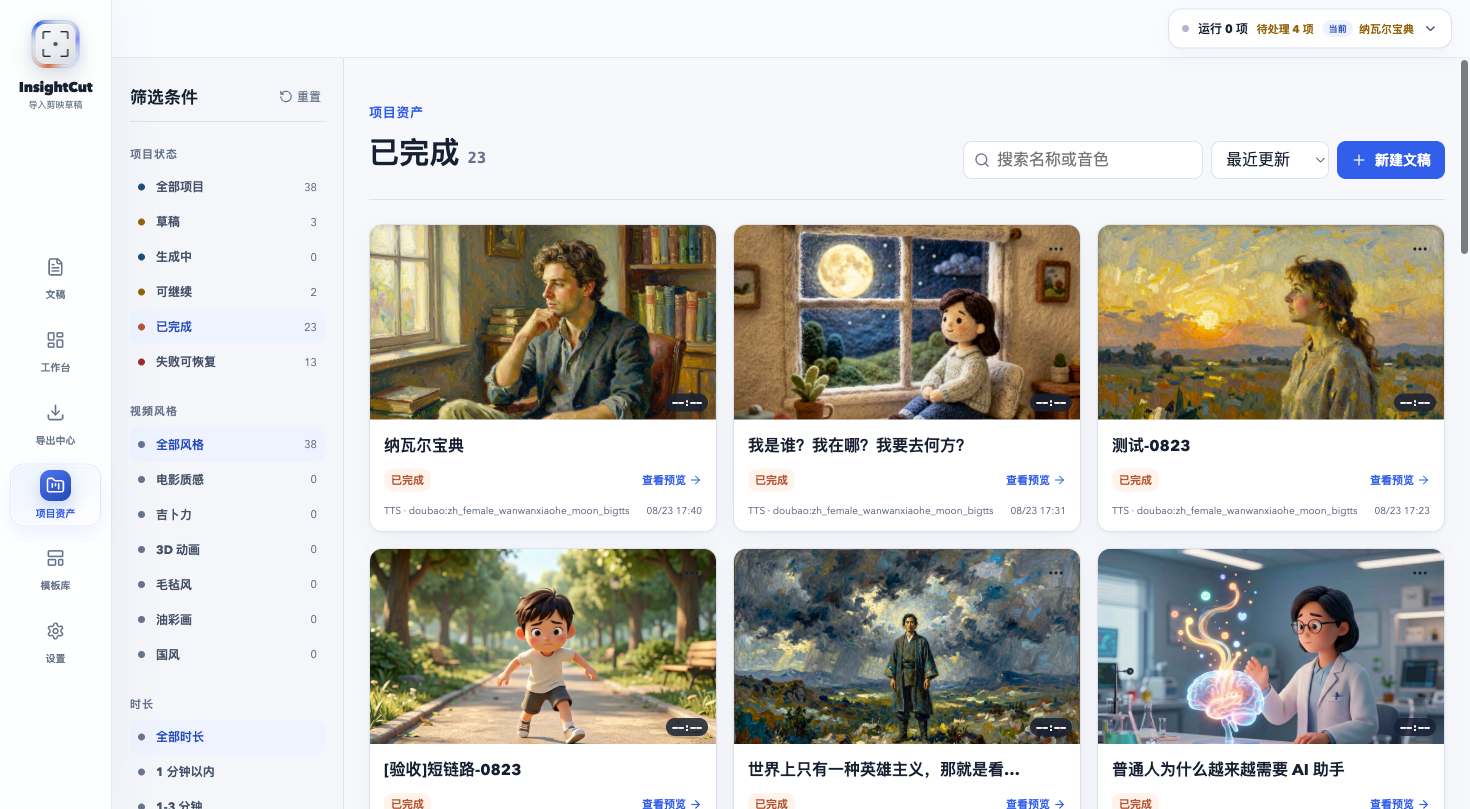
The project library brings together drafts, running jobs, resumable projects, completed work, and recoverable failures. Filter by status, visual style, or duration, then return directly to preview, recovery, or export.
How the workflow fits together
Topic / complete manuscript
  → manuscript preparation
  → storyboard and image prompts
  → voice and visual confirmation
  → AI images and TTS
  → subtitles and continuous preview
  → MP4 / asset package / Jianying or CapCut draft
Unlike a typical one-click generator, InsightCut treats each run as a project that can continue evolving. A single image can be regenerated, one voiceover can be replaced, and a failed generation can resume from the assets that already succeeded.
Highlights
- Generate a manuscript from a topic or preserve an existing script in manuscript mode.
- Select aspect ratio, visual style, writing style, and project name before starting.
- Review the full manuscript, short storyboard segments, image prompts, expected duration, and voice choice before spending image-generation quota.
- Generate images and TTS voiceovers per segment with precise progress and actionable error states.
- Retry only failed images or audio while retaining everything that already completed.
- Keep immutable image and audio histories, upload replacements, and reuse project assets.
- Preview the project continuously before deciding whether to render a complete MP4.
- Export a complete video, a per-segment asset package, or an editable Jianying / CapCut draft.
- Save production templates for visuals, voice, subtitles, concurrency, and retry policy.
- Configure LiteLLM text providers, Agnes image generation, Doubao TTS, Xiaomi MiMo TTS, and local voice clones.
Quick start
Requirements
- Python 3.11
- Node.js 22 and npm
- System FFmpeg and ffprobe; Poppler (pdftotext) for PDF extraction. imageio-ffmpeg does not include ffprobe.
1. Clone
git clone https://github.com/SkyNotSilent/insightcut-jianying-image-video.git
cd insightcut-jianying-image-video
2. Install the backend
cd ai-kepu-video-server
python3.11 -m venv venv311
source venv311/bin/activate
pip install -r requirements.txt
cp .env.example .env
3. Install the frontend
cd ../ai-kepu-video-web/frontend
npm install
4. Start the backend
Run inside ai-kepu-video-server/:
source venv311/bin/activate
python -m uvicorn api_server:app --host 127.0.0.1 --port 2002 --reload
- Backend: http://localhost:2002
- API docs: http://localhost:2002/docs
- Health check: http://localhost:2002/health
5. Start the frontend
Run in another terminal inside ai-kepu-video-web/frontend/:
npm run dev
Open http://localhost:2001. The frontend connects to http://localhost:2002 by default; set VITE_API_BASE_URL to override it.
6. Configure providers
Open http://localhost:2001/settings:
- Select a LiteLLM text provider and model, then enter the required credentials.
- Optionally validate the connection and synchronize models available to the account.
- Enter the Agnes image API key and verify the requested image size.
- Enable Doubao TTS, MiMo TTS, or both, and select the default provider for new tasks.
- Enable and preview voices. For MiMo voice cloning, confirm authorization and upload or record a reference.
- Save the configuration and return to the manuscript page.
Credentials remain in local configuration. Never commit .env, data/config.json, API keys, access tokens, or screenshots containing secrets.
Model and media providers
Text generation
LiteLLM manages known text providers with canonical model IDs and keeps OpenAI-compatible and Anthropic-compatible custom endpoints available under advanced settings.
Image generation
- API: OpenAI-compatible
images/generations - Model:
agnes-image-2.1-flash - Default concurrency: 8
- Built-in rolling 20-requests-per-minute throttle and HTTP 429 retry handling
Voice
- Doubao TTS: Access Token and API Key authentication, preset voices, speed, and volume.
- Xiaomi MiMo TTS: preset voices, style instructions, speed, and local VoiceClone references.
- Tasks and segments snapshot their provider, voice, and options so later global settings do not silently change old projects.
Jianying / CapCut delivery
The editable draft and the MP4 are separate deliverables. Writing a draft does not re-import the rendered MP4 or call a model again. InsightCut installs the current images, voiceovers, subtitles, and timeline into the selected draft directory.
- Open Export Center after a task is complete.
- Select the Mac or Windows draft format.
- Choose the Jianying / CapCut draft root. A common macOS location is
/Users/your-name/Movies/JianyingPro/User Data/Projects/com.lveditor.draft. - Write the project. The backend creates an isolated folder, copies assets and draft JSON, and rewrites paths for the target OS.
- Fully restart the editor if the new draft does not appear immediately.
When downloading a draft ZIP, extract it into its own project folder under the draft root. Importing the ZIP as ordinary media will not create an editable project.
Failure recovery
A failed task means the remaining pipeline stopped; it does not mean completed content was deleted. InsightCut preserves the current manuscript, storyboard, prompts, images, audio, and draft whenever possible.
From that state you can:
- inspect errors by provider, asset type, and segment;
- retry all failed assets or one exact image or voiceover;
- edit segment text or image prompts;
- upload a replacement or restore an earlier version;
- resume from a recovery point; or
- continue editing and exporting the assets that already completed.
Outputs
- MP4 with images, voiceover, subtitles, and basic motion.
- Editable Jianying / CapCut draft ZIP.
- Per-segment text, image prompts, and project records.
- Immutable image and audio generation, retry, upload, replacement, and reuse history.
- TTS audio and SRT subtitles.
- Local records used for recovery, re-voicing, and regeneration.
Technology
| Layer | Stack |
|---|---|
| Frontend | React 19, React Router 7, Vite 4, Axios, Lucide |
| Backend | FastAPI, Python 3.11 |
| Database | Local SQLite |
| Text | LiteLLM Provider Registry, OpenAI / Anthropic compatibility |
| Image | Agnes Image 2.1 Flash, OpenAI-compatible Images API |
| Voice | Doubao TTS, Xiaomi MiMo TTS, MiMo VoiceClone |
| Video | FFmpeg, imageio-ffmpeg |
| Drafts | pyJianYingDraft |
| Storage | Local data/media/ and output/ |
Repository layout
insightcut-jianying-image-video/
├── ai-kepu-video-server/          # FastAPI backend
│   ├── api_server.py              # Web API entry point
│   ├── src/                       # generation, tasks, media, and export logic
│   ├── data/                      # local database, media, and config (untracked)
│   └── output/                    # new generated tasks (untracked)
├── ai-kepu-video-web/frontend/    # React 19 + Vite frontend
├── docs/
│   ├── assets/                    # README brand assets
│   ├── screenshots/               # current product screenshots
│   ├── showcase/                  # playable videos from real projects
│   └── prd/                       # approved product requirements
└── scripts/                       # repository checks and maintenance tools
Tests and builds
Backend:
cd ai-kepu-video-server
source venv311/bin/activate
python -m pip install -r requirements-dev.txt
python -m pytest -q
Frontend:
cd ai-kepu-video-web/frontend
npm test
npm run test:components
npm run build
For a read-only local maintenance report:
cd ai-kepu-video-server
python scripts/maintenance_report.py --dry-run
Only an explicit --apply removes media files that are no longer referenced by the database.
Local data and security
Do not commit:
.env, API keys, access tokens, and App IDs;ai-kepu-video-server/data/local.db;data/media/,output/, and generation logs;- MiMo voice-clone references and previews; or
- screenshots containing credentials, account details, or local absolute paths.
Media is served through /media/{file_path}, searching output/ first and data/media/ second. The current project uses local SQLite and local files only.
More documentation
- On-demand preview and final-video export PRD
- Storyboard asset-package export PRD
- Engineering workflow
- Repository hygiene
- GitHub settings
Project status
InsightCut is an actively evolving, local-first, single-user product prototype. The current focus is completing the workflow most useful to individual creators: manuscripts, model configuration, storyboards, assets, voice, preview, recovery, and export.
Multi-user collaboration, cloud billing, multi-tenant accounts, a hosted template marketplace, and managed media storage are outside the current release scope.
License
Licensed under MIT. See Contributing and Security. Third-party dependencies, trademarks and non-owned media retain their own terms.